See what's new!

Subscribe to updates
© 2025 PromptForm.ai
Sep 11, 2025

CATEGORY: Functionality

DESCRIPTION: Reintroduced the display of the prompt name in streaming status messages for improved user context.

IMPACT: Users now have clearer insights into streaming operations as the prompt name is prominently shown, enhancing usability and information tracking.

Sep 11, 2025

CATEGORY: Functionality

DESCRIPTION: Implemented a Template Gallery for users to import starter apps, safeguarding the original app while enabling updates.
Learn more →

IMPACT: Users can seamlessly integrate starter apps into their projects, enhancing development efficiency while maintaining control over updates.

Sep 11, 2025

CATEGORY: User Interface

DESCRIPTION: Introduced a new Knowledge Center page allowing users to manage memories, tool connections, and documents in a consolidated space.
Learn more →

IMPACT: Users can efficiently manage context and resources, streamlining their workflow.

Aug 27, 2025

CATEGORY: User Interface

DESCRIPTION: Introduced a "Primary Color" style editor option, allowing partners to customize the primary color theme on the homepage.

IMPACT: Users can now personalize the homepage appearance to match their brand identity, enhancing the visual appeal and coherence of the user interface.

Aug 27, 2025

CATEGORY: User Interface

DESCRIPTION: Introduced a brand new Home page with quick chat access, Featured Categories, and Featured Apps.
Learn more →

IMPACT: Provides a more engaging and customizable entry point for users, making it easier to highlight important apps and categories while improving overall navigation.

Aug 20, 2025

CATEGORY: Functionality

DESCRIPTION: Introduced the ability for partners to view the API errors page, filtered by their apps only, enhancing visibility and troubleshooting capabilities.

IMPACT: Partners can now efficiently monitor and resolve API errors specific to their applications, streamlining management processes.

Aug 16, 2025

CATEGORY: User Interface

DESCRIPTION: Enhanced various chat and sidebar aspects, including updates to the bot editor, user message chat bubbles, chat message box, history panel, and app/bot filters.

IMPACT: Users will experience a streamlined and more intuitive messaging interface, aiding in efficient interaction and engagement.

Aug 16, 2025

CATEGORY: Functionality

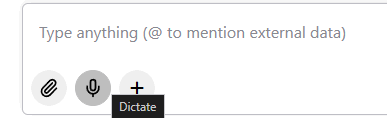
DESCRIPTION: Implemented speech input support in chat with automatic transcription.

IMPACT: Users can now add speech input into chat messages with the option to dictate voice audio, enhancing accessibility and efficiency in chat interactions.

Aug 16, 2025

CATEGORY: Functionality

DESCRIPTION: Introduced a stop button to terminate running models in chat, aiding deep research processes.

IMPACT: Users have better control over chat-based model executions, enhancing research productivity.

Aug 16, 2025

CATEGORY: User Interface

DESCRIPTION: Enhanced team management by displaying modals for both new and existing users, providing options for memory entry, plan, and website selection.

IMPACT: Team administrators can now access comprehensive modal interfaces, improving user management flexibility.

Aug 16, 2025

CATEGORY: Functionality

DESCRIPTION: Enabled functionality for pasting images from the clipboard directly into chat sessions, streamlining the sharing and communication of rich media content.

IMPACT: Users can now seamlessly integrate images into chat conversations, improving interactive engagement.

Aug 12, 2025

CATEGORY: User Interface

DESCRIPTION: Implemented an "Info" button for apps and bots that allows partners to easily access a list of permissions associated with each application. Additionally, users can now see the owner of the app or bot.

IMPACT: Partners can efficiently manage and debug their applications by having quick access to permission details, streamlining workflow and enhancing transparency.