See what's new!

Subscribe to updates
© 2025 PromptForm.ai
Jul 08, 2025

CATEGORY: Functionality

DESCRIPTION: Addressed a bug where users without usage_credits or plan credits set (but with monthly credits) did not see the credits section on their profile page. This section is now displayed correctly.

IMPACT: Users will now have a complete view of their credit information, enhancing transparency and account management.
Jul 08, 2025

CATEGORY: Functionality

DESCRIPTION: Updated the App Run History page to display the option's title instead of its real value for dropdown inputs. The actual values will now be visible only in Debug mode.

IMPACT: Enhances security by safeguarding sensitive data transmission to the LLM, ensuring only authorized views can access raw prompt data.

Jul 04, 2025

CATEGORY: Functionality

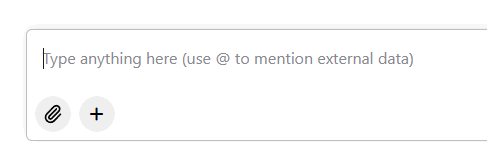
DESCRIPTION: Implemented a Memory Selector in chat interfaces, allowing users to reference saved custom field values during interactions.

IMPACT: Users can now seamlessly access and utilize saved values in custom fields by typing the "@" symbol, improving chat interaction efficiency.

Jul 03, 2025

CATEGORY: Functionality

DESCRIPTION: Added the ability to reference custom fields in app prompts via the "Insert" menu.

IMPACT: Users can now enhance prompt customization by integrating unique data points, improving app functionality and personalization.

Jul 01, 2025

CATEGORY: Functionality

DESCRIPTION: Enabled users to maintain subscriptions across more than one whitelabel site using the same email address.

IMPACT: Users can now participate in multiple PromptForm-associated sites without needing separate email addresses, ensuring broader accessibility and ease of management.

Jun 27, 2025

CATEGORY: User Interface

DESCRIPTION: Addressed style inconsistencies by adding and fixing custom style options for the Navbar, Sidebar, and History Panel. Includes resetting background image settings and border radius values for enhanced visual presentation.

IMPACT: Improved flexibility in customizing interface aesthetics ensures a more cohesive and visually appealing user experience.

Jun 27, 2025

CATEGORY: Functionality

DESCRIPTION: Removed restrictions on memory editing, allowing team members to edit a partner's memories without domain limitations.

IMPACT: Enhances team collaboration by granting team members unrestricted access to manage partner website memories.

Jun 25, 2025

CATEGORY: Functionality

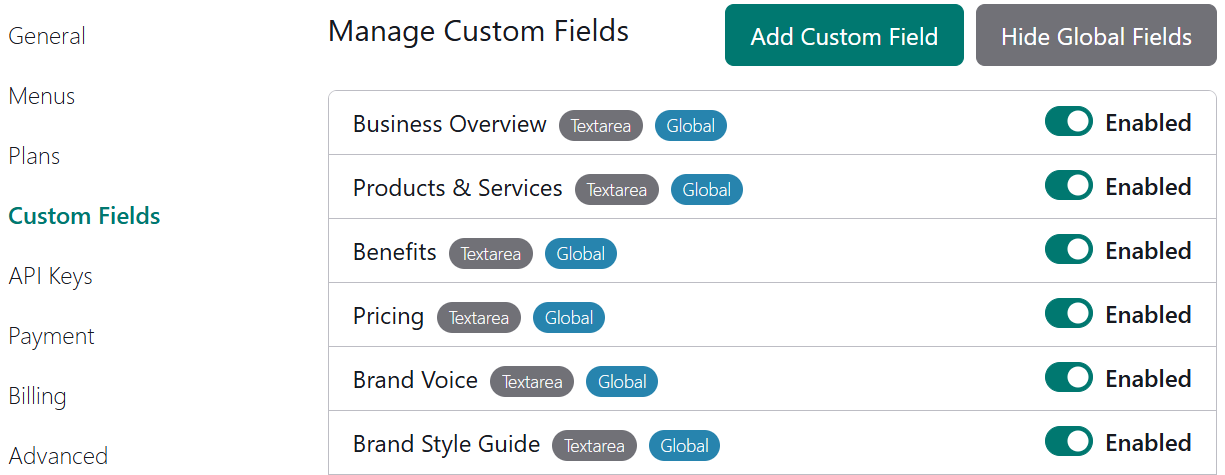
DESCRIPTION: With the recent release of Global Custom Fields, Partners can now disable those fields from Websites > Properties > Custom Fields, effectively hiding irrelevant fields from their users' profiles.

IMPACT: This enhancement allows partners to streamline user profiles by concealing unnecessary global custom fields, enhancing the relevance and usability for end-users.

Jun 25, 2025

CATEGORY: Functionality

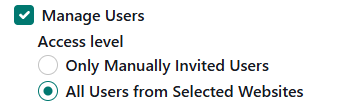
DESCRIPTION: Introduced the ability for team members to invite new users into the organization without requiring partner status. Members can configure permissions and manage users within a scoped environment.

IMPACT: This update empowers team members to grow their users more autonomously, providing flexibility and control tailored to specific roles and scopes within the organization.

Jun 19, 2025

CATEGORY: User Interface

DESCRIPTION: Applied various UI/UX improvements including styling updates to chat history, history page, and bot view style editor. Added custom style options for Chat page, and improved navbar logic. Removed unused dark mode files and enhanced loading times.

IMPACT: Users will experience smoother navigation and interaction with enhanced styling and performance, leading to a more seamless and visually appealing interface.

Jun 19, 2025

CATEGORY: Functionality

DESCRIPTION: Implemented feature to display uploaded files in app details page, facilitating easier debugging and review of uploaded content.

IMPACT: Users can now view uploaded files directly in debug mode, enhancing the efficiency of troubleshooting and content verification.