See what's new!

Subscribe to updates
© 2025 PromptForm.ai

Functionality

Sep 17, 2025

CATEGORY: Functionality

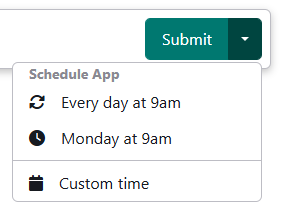
DESCRIPTION: Introduced the ability to schedule apps based on time-based triggers (weekly, daily, etc.). Users can automate workflows to run at specified intervals, such as a daily app that executes tasks and sends emails through tools use.
Learn more →

IMPACT: Users can enhance productivity by automating routine tasks and scheduling app executions, allowing for hands-free operation and timely process management.
Sep 15, 2025

CATEGORY: Functionality

DESCRIPTION: Removed duplicated properties for the Flux model, optimizing it for performance and removing it from Pro Ultra variants where unsupported.

IMPACT: Users will experience improved performance and reduced clutter for versions of the Flux model, notably enhancing application efficiency.

Sep 11, 2025

CATEGORY: Functionality

DESCRIPTION: Fixed a bug where URL scraping incorrectly added data to all custom fields instead of the specific field, and enhanced feedback with successful file import and URL scrape notifications.

IMPACT: Users benefit from precise data scraping operations and clearer import success acknowledgments, improving data management accuracy and user feedback.

Sep 11, 2025

CATEGORY: Team Management

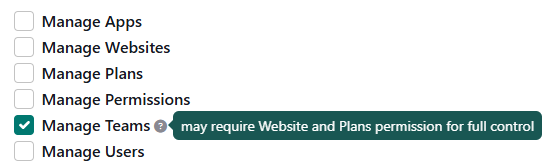
DESCRIPTION: Empowered partners with the capability to invite and update team users with permissions to manage Teams, facilitating cohesive team management.

IMPACT: Partners can now extend administrative privileges to selected team members, promoting collaboration and effective account oversight.

Sep 11, 2025

CATEGORY: Functionality

DESCRIPTION: Rectified an issue that prevented messages from being sent when initiating chats from the homepage. This was happening when the bot has an intro message.

IMPACT: Users can reliably start chats from the homepage without facing any message dispatch errors, ensuring smooth communication and user experience.

Sep 11, 2025

CATEGORY: Functionality

DESCRIPTION: Reintroduced the display of the prompt name in streaming status messages for improved user context.

IMPACT: Users now have clearer insights into streaming operations as the prompt name is prominently shown, enhancing usability and information tracking.

Sep 11, 2025

CATEGORY: Functionality

DESCRIPTION: Implemented a Template Gallery for users to import starter apps, safeguarding the original app while enabling updates.
Learn more →

IMPACT: Users can seamlessly integrate starter apps into their projects, enhancing development efficiency while maintaining control over updates.

Aug 20, 2025

CATEGORY: Functionality

DESCRIPTION: Introduced the ability for partners to view the API errors page, filtered by their apps only, enhancing visibility and troubleshooting capabilities.

IMPACT: Partners can now efficiently monitor and resolve API errors specific to their applications, streamlining management processes.

Aug 16, 2025

CATEGORY: Functionality

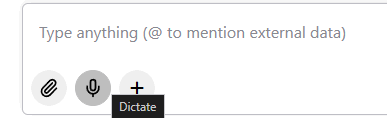
DESCRIPTION: Implemented speech input support in chat with automatic transcription.

IMPACT: Users can now add speech input into chat messages with the option to dictate voice audio, enhancing accessibility and efficiency in chat interactions.

Aug 16, 2025

CATEGORY: Functionality

DESCRIPTION: Introduced a stop button to terminate running models in chat, aiding deep research processes.

IMPACT: Users have better control over chat-based model executions, enhancing research productivity.

Aug 16, 2025

CATEGORY: Functionality

DESCRIPTION: Enabled functionality for pasting images from the clipboard directly into chat sessions, streamlining the sharing and communication of rich media content.

IMPACT: Users can now seamlessly integrate images into chat conversations, improving interactive engagement.

Aug 12, 2025

CATEGORY: Functionality

DESCRIPTION: Introduced background mode for deep research OpenAI models along with UI notifications (sound, push) to alert users when a prompt is processed. This update also supports the ability to stop an ongoing process.

IMPACT: Users can now work on other tasks while waiting for prompt completion, improving productivity. Notifications ensure that users are promptly informed when their results are ready, enhancing the user experience.