See what's new!

Subscribe to updates
© 2025 PromptForm.ai

UI/UX

Mar 26, 2025

CATEGORY: User Interface

DESCRIPTION: Resolved a mobile view issue where app descriptions did not wrap correctly when the "With Cover Image" style option was selected.

IMPACT: Enhances readability and presentation of app descriptions on mobile devices.
Mar 26, 2025

Category: User Interface

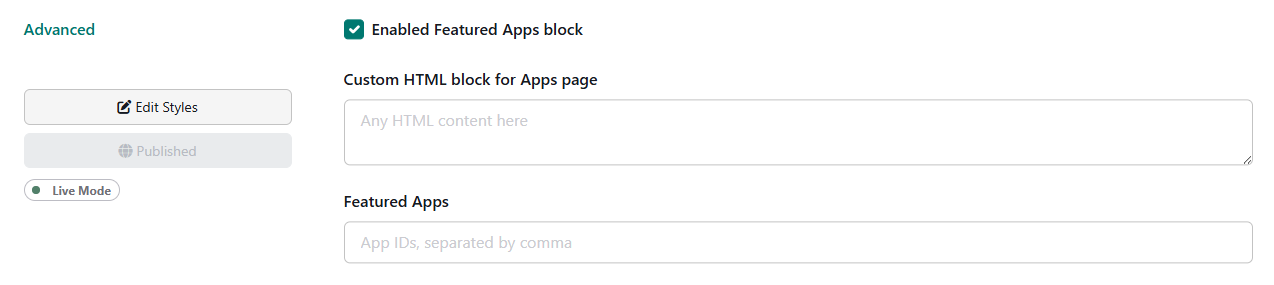
Description: Introduced functionality allowing partners to feature apps by selecting and arranging the order of their display. Partners can also add an optional custom HTML block for heading and subtitle of the featured section. It can be configured from Websites > Advanced settings.

Impact: Partners can now highlight key apps, customize their display, and enhance user engagement with their app offerings.

Mar 22, 2025


CATEGORY
: User Interface

DESCRIPTION: Fixed layout issues where long titles or subtitles broke the app card layout. Text now wraps correctly to maintain design integrity.

IMPACT: Enhances visual consistency and accessibility, ensuring application design remains coherent across various screen sizes.

Mar 22, 2025

CATEGORY: User Interface

DESCRIPTION: Corrected a bug that prevented users from editing and saving history names in the split view layout.

IMPACT: Users can now easily update history names, improving usability and record management within applications.

Mar 19, 2025

CATEGORY: User Interface

DESCRIPTION: Developed a feature for previewing website styles directly within the app interface, aligning with the Admin Settings UI/UX improvements.

IMPACT: Users can now seamlessly visualize style changes in real-time, enhancing design processes and decision-making.

Mar 19, 2025

CATEGORY: User Interface

DESCRIPTION: Added a website selector dropdown to the top navigation, enabling users to switch between different websites seamlessly. This includes an option to add new websites.

IMPACT: Users can now manage multiple websites more efficiently, enhancing navigation and customization of the UI according to the selected site.

Mar 19, 2025

CATEGORY: User Interface

DESCRIPTION: Resolved an issue causing the editor toolbar to overflow in the splitview layout when the browser width is below 1400px.

IMPACT: Users can now enjoy a seamless splitview experience without unnecessary scrolling, enhancing usability on smaller screens.

Mar 01, 2025

CATEGORY: User Interface

DESCRIPTION: Implemented an account-level menu within the top navigation bar, organizing key account functions such as profile settings, billing information, training resources, and logout options.

IMPACT: Provides users with intuitive, straightforward access to essential account management functions, enhancing user experience.

Mar 01, 2025

CATEGORY: User Interface

DESCRIPTION: Revamped the Split View layout. Changes include updated theme colors for text, softer rounded corners across sections, and updates to button names and positions. Additionally, the "See More" section now truncates app descriptions by lines instead of characters for optimal space utilization across screen sizes.

IMPACT: Users will experience a visually cohesive and modern interface with improved readability and aesthetic appeal.

Feb 12, 2025

CATEGORY: User Interface

DESCRIPTION: Resolved an issue where the bots menu item could not be renamed and defaulted back to the original name due to system constraints.

IMPACT: Users can now rename the bots menu item, allowing for better customization and management of bot functionalities.

Feb 12, 2025

CATEGORY: User Interface

DESCRIPTION: Implemented foundational changes to the front-end framework to enhance future compatibility with light and dark modes. Initial release includes light mode with minor color adjustments.

IMPACT: While this update is mostly behind-the-scenes, it sets the stage for a more flexible UI theme infrastructure, allowing for smoother future enhancements, including potential dark mode integration.

Feb 12, 2025

CATEGORY: Functionality

DESCRIPTION: Redesigned plan management to be conducted at the individual website level instead of a general level. This improvement aims to facilitate easier site transfers and enhance organization and UI/UX experience.

IMPACT: Users are empowered to manage their plans more efficiently, allowing for seamless transitions and better organizational structure.